


LA Times: Essential California
2.91.41K Reviews
App Specs
- Version
- 5.1.03
- Updated On
- License
- Free
- Downloads
- 500,000+
- Developer
- NantMedia Holdings, LLC
- Categories
- News & Magazines
- Platform
- Android
Screenshots

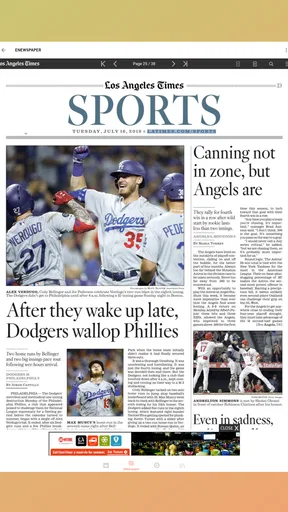

 Analysis by AppCompare
I think LA Times: Essential California makes the most sense for readers who want a regular window into California, rather than another app trying to cover every corner of the world. Its focus can be a real advantage: when I want to understand a local issue or follow a story affecting the state, a publication with a California perspective feels more useful than a broad headline feed. The value, though, depends on how much of that coverage you can read without paying and whether you want a dedicated source in your daily routine.
What the free download does—and does not promise
The app is free to download, which makes it easy to try before deciding whether it belongs on your phone. That should not be confused with unlimited free reading: access to all articles may require a subscription, so I would treat the free entry point as a chance to explore the experience, not as a guarantee that every story is included at no cost. In-app purchases are listed from $0.99 to $19.98 per item, but those figures alone do not tell me which purchase unlocks which content or how long access lasts. I would check the specific offer shown in the app before buying.
That distinction matters if you mainly want occasional headlines. A free download can still be worthwhile for sampling the coverage, but a reader who expects every article to remain available without payment may find the boundary frustrating. I would browse first, note how often I reach a subscription prompt, and only then judge whether paid access fits my habits. The publisher is NantMedia Holdings, LLC, and the app is in the news and magazines category; its purpose is editorial reading, not a general-purpose local-services toolkit.
Where the value comes from
For me, the strongest reason to keep a California-focused news app is continuity. A quick headline tells me that something happened; following the reporting over several days can help me see what changed, which people or institutions are involved, and why a local development matters beyond the first alert. That is a different kind of value from a social feed, where a developing story can be mixed with commentary, reposts, and unrelated posts before I have a clear picture.
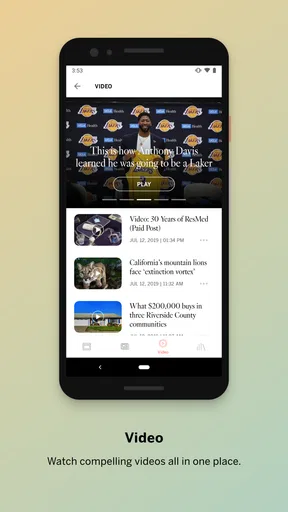
Photos and videos can also make coverage easier to take in when the subject is a place, an event, or a visible change in the state. They are not a substitute for reading the reporting, but they give me another way to understand a story when I have only a short break. If I am waiting for an appointment, for instance, I can scan a headline and image, then return to the article later when I have time to follow the details. I would avoid assuming that every piece includes multimedia; the practical value is that the app can present reporting in more than one format.
The app has a 3.1 average from around 3,700 ratings, alongside roughly 1,400 written reviews, so I would not take its reputation as universally settled. Those figures are a prompt to try it with realistic expectations rather than a verdict on whether it will work for me. It has been available since January 20, 2011, and its current version is 5.0.98; it runs on operating systems from version 8.0 onward. It has over 500,000 installs, and its Everyone 10+ age rating makes it suitable for a broad audience while still signaling that the content is not specifically aimed at young children.
A more useful way to fit it into a day
I would use it in short, deliberate visits instead of letting alerts dictate my attention. In the morning, I might check the main coverage for a story with a direct effect on my plans, such as a developing local situation, then use search later to return to a subject I want to understand better. This is more manageable than opening a stream of notifications every time the phone lights up, and it lets me decide when a story deserves more than a headline.
Worth Reading Before You Choose

EA SPORTS FC Mobile 26 Is a Bigger Football Game, but It Takes Time

Flipboard Shows What News Apps Must Do Beyond the Feed

Switching to Android Auto Means Rethinking Your Driving Routine

Google Calendar Makes a Crowded Week Easier to Manage

Ludo King Makes the Most of the Minutes Between Plans

Baby Panda World Brings Quick Play to Modern Phones, but Its Game Library Feels Busy
Alerts are most useful when I choose them carefully. If I turn on every available breaking-news notification, the phone can become another source of interruptions; I would start with only the subjects I genuinely need to follow and adjust if the alerts feel noisy. That is particularly important for readers who check news during work or family time. A notification should help me decide whether to open the app, not make me feel obliged to read every update the moment it arrives.
Search has a different job from browsing. Browsing is good when I have a few minutes and want to see what is being covered; search is better when I remember a topic but not the exact headline. For a longer-running issue, I would search the subject again rather than rely on one alert to provide the whole story. This simple habit helps turn the app from a quick headline check into a reference point, while still leaving room to compare coverage elsewhere.
How it compares with other ways to follow California
Compared with a general news aggregator, this app is a more focused choice. Aggregators can be handy when I want headlines from many publishers in one place, but their breadth can make it harder to follow one publication’s reporting consistently. Here, the appeal is the LA Times’ editorial perspective and California emphasis. The trade-off is equally clear: if I want a wide range of viewpoints or extensive coverage of international stories, I would pair it with another source instead of expecting this app to do everything.
Social media can surface a local event quickly, especially when people nearby are posting about it, but speed and context are not the same thing. I would use social posts as a signal that something may be happening, then look for reported coverage before treating details as settled. A dedicated news app is a calmer place to read an article, though it cannot replace checking multiple sources when a story is contentious or when I need a broader perspective.
There is also a choice between reading in an app and visiting a news site in a browser. The app is more convenient if I want one familiar place for reading, searching, and managing alerts. A browser may be enough for someone who reads only an occasional article and does not want another app on their phone. In other words, the main benefit is not that a dedicated app is automatically better; it is that the focused experience can make regular reading easier for someone who already values this publication’s coverage.
Who is likely to get the most from it
I would recommend giving it a try if you live in California, have family or work ties there, or follow state and local issues from elsewhere. It is especially suitable for a reader who wants to check reporting throughout the week and is willing to consider a subscription if the coverage proves useful. Someone who only wants a quick glance at national headlines, or who prefers a single feed combining many publishers, may be better served by a broader news app.
It may also be a poor fit if your budget requires every article to be free. The download costs nothing, but the subscription boundary is important enough that I would not install it assuming all content will be included at no charge. Likewise, if you dislike notifications, you can simply keep the app for on-demand reading rather than building your routine around alerts. The key question is whether California-focused reporting earns a regular place in your reading, not whether the app can replace every other news source.
My practical verdict
For an everyday reader, the best test is to install it, explore the coverage you care about, and see how often the app gives you enough context to make a return visit worthwhile. Before making a purchase, read the terms attached to the specific in-app option and decide whether the amount of reporting you expect to use justifies the cost. That is a more reliable way to assess value than assuming that a free download means free access to everything.
I would choose LA Times: Essential California for a steady, California-centered reading habit, especially when local context matters more to me than a single feed covering every subject and region. I would skip it if I wanted an entirely free, all-purpose news source or did not expect to read this publication regularly. Its strongest case is focused reporting that can become part of a routine; its main compromise is that full access may require payment, so the value is personal rather than automatic.
Alright, folks, let's dive into the world of news apps with a look at LA Times: Essential California. If you’re like me and you crave staying updated with everything happening in the Golden State, this app might just be what you need. I took it for a spin, and here’s what I think.
First Impressions
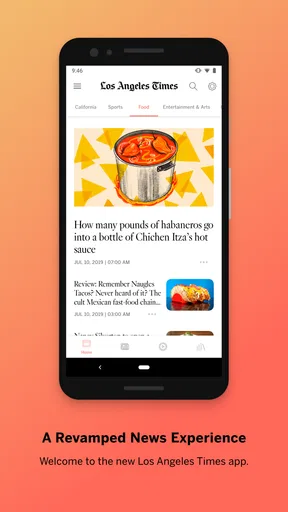
When you first fire up the app, you're greeted with a clean and modern interface. It's all about simplicity and ease of use, which I totally appreciate. You know how some apps just bombard you with too much info all at once? Not here. It’s like a breath of fresh air, guiding you smoothly through the latest news without feeling overwhelmed.
Navigation and Ease of Use
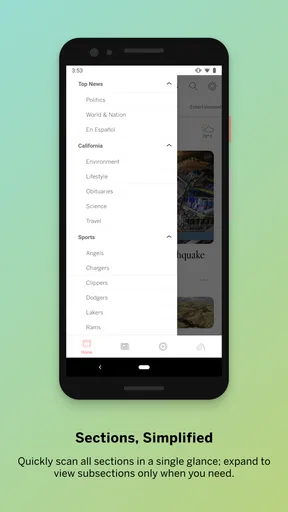
The app’s navigation is pretty straightforward. At the bottom, you’ve got your main sections: Top Stories, Local News, Politics, and Entertainment. It’s like having the entire California news landscape right at your fingertips. Each section is neatly organized, making it easy to jump between topics. And let’s talk about the search function—super handy if you’re looking for something specific, like the latest on California wildfires or updates on state legislation.
Content Quality
No doubt, the LA Times has a reputation for stellar journalism, and this app doesn’t fall short. The articles are well-written, engaging, and packed with the kind of detail that keeps you well-informed. The app also includes multimedia elements like photos and videos, which are a nice touch, especially when you want a break from reading.
Notifications and Customization
One of my favorite features is the customizable notifications. You can set alerts for breaking news, which is great for staying on top of major events without constantly checking your phone. Plus, you can tailor these notifications to your interests. Want more entertainment news and less politics? No problem, just tweak your settings. It’s like the app knows me!
User Experience
Overall, using the app feels smooth and intuitive. There were no annoying lags or crashes during my time with it, which is always a big plus. The fonts are easy on the eyes, and the overall layout makes reading a pleasure. It really feels like the developers put a lot of thought into making the user experience top-notch.
Subscription and Extras
Now, here’s the thing: to get full access to all the articles, you’ll need a subscription. But, honestly, if you’re a news junkie like me, it’s worth it. Plus, they offer some exclusive content for subscribers, which adds extra value. And let’s face it, supporting quality journalism is always a good idea.
The Verdict
So, what’s my take? If you're living in California or just someone who wants to keep up with the latest happenings there, the app is a solid choice. With its sleek design, quality content, and user-friendly features, it’s definitely worth checking out. Whether you're sipping coffee on your porch or stuck in LA traffic, this app keeps you connected to all things California.
So go ahead, give it a download, and see for yourself why this app might just become your go-to source for California news. Happy reading!
Pros
- User-friendly interface for easy navigation.
- Local news coverage is comprehensive.
- Timely updates keep you informed.
- Customizable notifications for specific topics.
- Offline reading mode available.
Cons
- Limited international news coverage.
- Some features require subscription.
- Occasional app performance issues.
- Ads may interrupt reading experience.
- No dark mode option available.
FAQs for LA Times: Essential California
What features does the LA Times: Essential California app offer?
The LA Times: Essential California app provides users with access to the latest news and updates from across the state. Key features include breaking news alerts, in-depth articles, multimedia content like videos and photo galleries, and personalized news feeds tailored to your interests. The app also offers offline reading capabilities, allowing users to access content without an internet connection.
Is the LA Times: Essential California app free to use?
The app is free to download; however, access to some premium content may require a subscription. Users can read a limited number of articles for free each month. To unlock unlimited access, a digital subscription is available, providing full access to all articles, exclusive reports, and additional features.
How often is the content updated on the LA Times: Essential California app?
Content on the LA Times: Essential California app is updated continuously throughout the day. The app provides real-time news alerts to keep users informed about the latest developments. Major stories, breaking news, and in-depth analyses are regularly refreshed, ensuring users have access to the most current information.
Can I customize the news feed on the LA Times: Essential California app?
Yes, the app allows users to personalize their news feeds by selecting topics of interest. Users can choose from various categories such as politics, entertainment, sports, and more. This customization helps in receiving news that is most relevant to individual preferences, enhancing the overall user experience.
What devices are compatible with the LA Times: Essential California app?
The LA Times: Essential California app is compatible with both Android and iOS devices. It requires a minimum operating system version to ensure optimal performance. Users should check the app store listing for specific compatibility requirements and any recent updates to ensure their device can support the app efficiently.


